Get Creative with Funmaker: A Chunky Display Typeface for Handmade and Heartfelt Projects
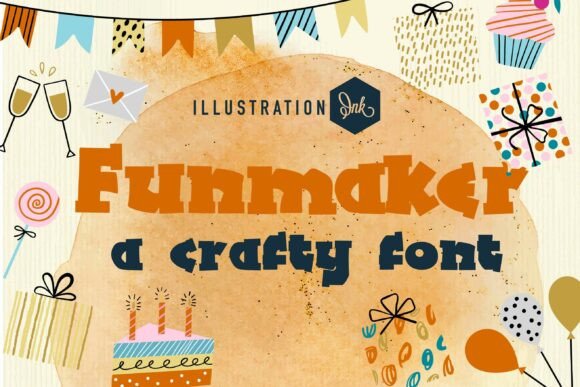
Funmaker is a unique and charming chunky display typeface that embodies the essence of handmade and heartfelt design. Its massive, solid block letterforms and rhythmic, irregular edges mimic the imperfections of hand-cut paper or woodblock printing, making it a perfect choice for adding a personal touch to your projects.
Why Choose Funmaker?
Whether you're designing for an independent craft fair, creating a DIY workshop logo, or crafting a children's book title, Funmaker offers a bold structural presence and tactile personality. Its distinctive style can also elevate high-impact social media headers, making it a versatile and eye-catching option for various creative endeavors.
Mistake 1: Overusing the Font in Large Text Blocks
While Funmaker is visually striking, using it for large text blocks can overwhelm the reader. The font's bold and chunky nature makes it best suited for headlines, titles, and short, impactful statements. For longer text, consider pairing Funmaker with a more readable, complementary font to maintain clarity and balance.
Mistake 2: Ignoring Context and Audience
Not every project or audience will appreciate the whimsical and handmade feel of Funmaker. Before choosing this font, consider the context and the target audience. For instance, a professional business report might not be the right fit, but a playful children's book or a creative workshop flyer would benefit from its unique charm.
Mistake 3: Neglecting Proper Spacing and Alignment
One of the key features of Funmaker is its irregular edges, which can sometimes lead to spacing and alignment issues if not handled carefully. Ensure that the letters are well-spaced and aligned to avoid a cluttered or unprofessional appearance. Tools like Adobe Illustrator or InDesign can help you fine-tune these details.
Mistake 4: Not Testing on Different Devices and Formats
Fonts can look different on various devices and formats, so it's crucial to test Funmaker across all intended platforms. What looks great on a desktop screen might not translate well to a mobile device or print. Always do a thorough check to ensure the font maintains its impact and readability on all intended outputs.
Choose the Right Complementary Fonts
To enhance the overall design, pair Funmaker with clean, simple fonts. Sans-serif fonts like Arial or Helvetica can provide a good contrast, making the text more readable and the design more cohesive. For example, use Funmaker for the main heading and a sans-serif for the body text.
Consider the Brand and Project Tone
Align the use of Funmaker with the overall tone and brand identity of your project. If the brand is playful and creative, Funmaker can be a great match. However, if the brand has a more serious or minimalist aesthetic, it might be better to choose a different font that aligns more closely with those values.
Use Funmaker for Highlighting Key Messages
Leverage Funmaker's bold and attention-grabbing qualities to highlight key messages or calls to action. This can be particularly effective in promotional materials, such as flyers, posters, and social media graphics. Just remember to use it sparingly to keep the focus on the most important elements.
Check Licensing and Compatibility
Before downloading and using Funmaker, make sure to check the licensing terms to ensure you have the right to use it for your specific project. Additionally, verify that the font is compatible with the software and platforms you plan to use. This can save you from potential legal issues and technical headaches down the line.
By being mindful of these common mistakes and following the practical advice, you can make the most of Funmaker's unique and charming qualities. Whether you're a beginner or a seasoned designer, Funmaker can add a special touch to your creative projects, making them stand out with a handmade and heartfelt soul.