Take Flight with Borer: A Majestic Display Typeface for Bold and Impactful Designs
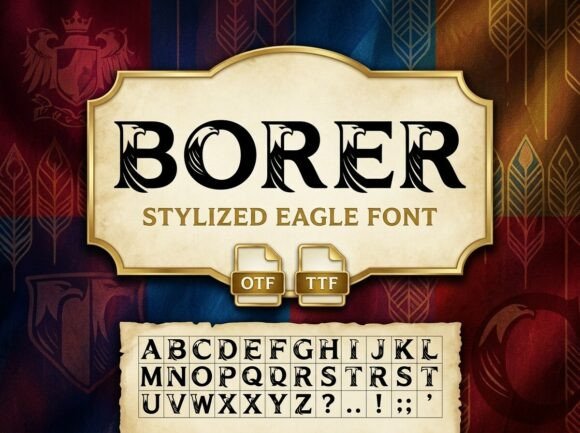
Borer is a unique and captivating display typeface that seamlessly blends the ancient art of heraldic design with modern, high-impact aesthetics. This font features bold, high-contrast letterforms, each uniquely characterized by rhythmic, hand-drawn eagle silhouettes integrated into the negative space and stems of every character. Whether you're designing for independent athletic team logos, historical military gaming, outdoor adventure apparel, or high-impact social media headers, Borer offers a premier choice that stands out.
Why Choose Borer?
Borer's distinctive design makes it an ideal choice for projects that require a sense of strength, history, and majesty. The integration of eagle silhouettes adds a dynamic and symbolic element to the typography, making it perfect for brands and designs that aim to convey power, freedom, and heritage. However, choosing and using Borer effectively requires careful consideration to avoid common pitfalls.
Avoiding Common Mistakes with Borer
One of the most common mistakes when using Borer is overusing it in a design. While its bold and detailed nature is visually striking, too much of it can overwhelm the viewer and detract from the overall message. It's important to use Borer as a focal point rather than a primary text, ensuring that it complements rather than competes with other elements.
Mistake 1: Overusing Borer in Text
Using Borer for long paragraphs or extensive text can make your design look cluttered and hard to read. Instead, reserve Borer for headings, logos, or short, impactful statements. For example, if you are designing a sports team logo, use Borer for the team name but opt for a cleaner, more legible font for additional information like the team's founding year or location.
Mistake 2: Ignoring Context and Audience
Borer's strong, heroic-and-heraldic style may not be suitable for all contexts. For instance, using Borer for a children's book or a minimalist brand might feel out of place. Always consider the target audience and the overall tone of the project. If you are unsure, start by testing Borer in a small section of your design and gather feedback from your audience.
Mistake 3: Poor Color and Background Choices
The high-contrast and intricate details of Borer can sometimes get lost if the color and background choices are not carefully considered. Using Borer on a busy or similarly colored background can make the text difficult to read. Opt for high-contrast combinations, such as dark text on a light background, or vice versa, to ensure clarity and impact.
Practical Advice for Using Borer Effectively
To make the most of Borer, follow these practical tips:
- Use Borer Sparingly: As mentioned, Borer is best used in moderation. Use it for key elements like titles, headlines, or logos, and pair it with simpler, more readable fonts for body text.
- Test and Iterate: Before finalizing your design, test Borer in different sizes and contexts. Gather feedback from your target audience to ensure it resonates and is effective.
- Consider the Overall Design: Borer should complement, not overshadow, the rest of your design. Ensure that the font fits well with the overall aesthetic and theme of your project.
- Check Licensing and Usage Rights: Before downloading and using Borer, make sure to check the licensing terms. Some fonts have specific usage restrictions, and it's important to comply with these to avoid legal issues.
Realistic Examples and Better Approaches
For a real-world example, consider a local sports team looking to rebrand. They could use Borer for their team name and tagline, creating a powerful and memorable logo. For the team's website, they might use a clean, sans-serif font for the main content, reserving Borer for the site's header and key sections. This approach ensures that the design is both impactful and user-friendly.
Another example is a historical military game. Borer can be used for the game's title and major in-game text, providing a sense of grandeur and historical authenticity. For in-game menus and instructions, a more readable font would be more appropriate, ensuring that players can easily navigate and understand the game's mechanics.
Final Thoughts
Borer is a versatile and powerful font that can add a unique and majestic touch to your designs. By avoiding common mistakes and following practical advice, you can harness the full potential of Borer to create impactful and visually stunning projects. Remember to always consider the context, audience, and overall design, and don't hesitate to test and iterate to achieve the best results.